
Introduction
Seeing “Admission Still in Progress” on your JAMB CAPS page is a stressful thing. You wrote the UTME and went through your school’s screening, and now you just want to know where you stand.
By now you have probably refreshed that page more times than you can count. Maybe some of your friends have already got their offers while yours still says the same thing. It is hard not to start wondering if something went wrong.
Let me put your mind at ease a little. That message does not mean you have been rejected. It simply means your school has not yet uploaded a final decision for you. But don’t just sit and wait. Take a look at your O’level results, your course requirements and the rest of your details to be sure everything is in place.
Below, I explain what the message really means and why it shows up. I will also show you how to check your status, what to do about common problems, and when it makes sense to call JAMB or your school.
What Does “Admission Still in Progress” Mean on JAMB CAPS?
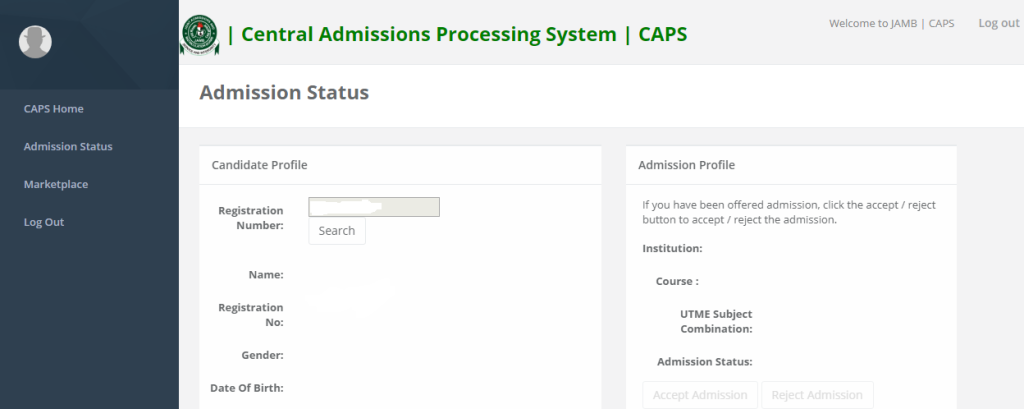
“Admission Still in Progress” on the Joint Admissions and Matriculation Board (JAMB) Central Admissions Processing System (CAPS) means that your admission has not yet reached a final outcome displayed on your candidate profile.
Your chosen institution may still be processing applications, reviewing candidates, recommending applicants for admission, or waiting for the necessary approval within the admissions system.
JAMB CAPS manages the admission process between tertiary institutions and JAMB. It allows candidates to check their admission status and accept or reject admission offers when they become available.
You can visit the official JAMB CAPS portal here:
JAMB CAPS Portal: https://caps.jamb.gov.ng/
You can also access your candidate account through the official JAMB e-Facility portal:
JAMB e-Facility: https://efacility.jamb.gov.ng/
If your status says “Admission Still in Progress,” it does not necessarily mean that you have been rejected. It also does not guarantee that you will eventually receive an admission offer.
Your final outcome depends on your qualifications, your institution’s admission requirements, available spaces, and the progress of your application through the admission process.
Is “Admission Still in Progress” the Same as “Not Admitted”?
No. Although both messages indicate that you do not currently have a confirmed admission offer displayed on CAPS, they are not identical.
Understanding the difference can help you decide what to do next.
| JAMB CAPS status | What it means | What you should do |
|---|---|---|
| Admission Still in Progress | A final admission decision has not yet appeared on your profile. | Check your application requirements and monitor your status. |
| Not Admitted | You have not been offered admission at the time of checking. | Check your school’s admission list, eligibility requirements, and any outstanding issues. |
| Admitted | An admission offer has been recorded on CAPS. | Follow the instructions to accept or reject the offer. |
| Admission offer pending action | An offer may require your response, depending on the exact message displayed. | Read the instructions and respond within the applicable deadline. |
Keep in mind that admission statuses can change as the admission exercise progresses. A candidate who sees “Not Admitted” or “Admission Still in Progress” should not assume that the outcome is permanent unless the institution or JAMB has communicated a final decision.
Why Is My JAMB CAPS Showing “Admission Still in Progress”?
Several reasons may explain why your JAMB CAPS status has not changed. The exact cause depends on your institution and the stage your application has reached.
1. Your Institution Has Not Completed Its Admission Process
One common explanation is that your chosen institution is still processing admissions.
Universities, polytechnics, colleges of education, and other tertiary institutions may process applications in different stages or batches. Some candidates may receive offers before others, even when they applied to the same institution.
If your school has not completed the relevant admission procedures, your CAPS status may remain unchanged.
What to do: Visit your institution’s official website and check its admission announcements. Confirm whether the admission list for your programme or category has been released.
Do not rely solely on social media posts claiming that an admission list is out. Verify the information through your school’s official admission portal.
2. Your Institution Has Not Recommended You to JAMB
Admission involves more than appearing on a school’s screening list.
Your institution must process your application through the appropriate admission procedures. Where necessary, the institution must recommend you for admission before JAMB can complete its own approval process.
JAMB’s official support guidance identifies an outstanding institutional recommendation as one possible reason an admission offer may not yet appear on CAPS.
What to do: Check your school’s admission portal first. If the institution indicates that you have been shortlisted or recommended but CAPS has not updated, contact the admissions office to confirm the stage of your application.
You can also consult the official JAMB support knowledge base.
3. Your O’level Results Have Not Been Uploaded or Verified
Your WAEC, NECO, or NABTEB results may be relevant to your admission, depending on the requirements for your chosen programme.
If you registered for JAMB using awaiting results or your results have not been properly uploaded to your JAMB profile, your admission process may be affected.
Even if you submitted your results during your institution’s screening exercise, you should confirm that they are available on your JAMB profile.
How to check and resolve the issue:
- Visit the official JAMB e-Facility portal at https://efacility.jamb.gov.ng/.
- Log in with your registered account details.
- Locate the relevant section for your candidate profile and admission services.
- Check whether your O’level results are reflected correctly.
- If your results are missing, contact an accredited JAMB CBT centre or an appropriate JAMB office for assistance with uploading them.
Do not assume that submitting your results to your school automatically means they have been uploaded to JAMB.
4. Your Course Requirements May Not Be Fully Met
Meeting the general JAMB minimum score does not automatically qualify you for every course.
Your institution may consider your UTME score, subject combination, O’level credits, screening performance, age eligibility, and other applicable requirements.
For example, a candidate applying for Medicine, Law, Engineering, or Nursing may face specific subject and qualification requirements that differ from those for other programmes.
If your application does not meet the requirements for your selected course, your admission may be delayed or you may not be considered eligible.
What to do: Check your institution’s official admission requirements for your course and admission year. Confirm that your UTME subject combination and O’level results meet the published requirements.
You can consult JAMB’s Integrated Brochure and Syllabus System (IBASS) at https://ibass.jamb.gov.ng/ for relevant programme requirements.
5. Your Admission Is Being Processed in Batches
Some institutions release admission lists in stages rather than publishing every successful candidate at once.
For example, a school may release a merit list before supplementary lists or other categories of candidates are processed.
If your application is still under consideration, your CAPS status may remain unchanged while the process continues.
However, not every institution uses the same admission schedule, and a pending status is not proof that your name will appear in the next batch.
What to do: Monitor your institution’s official admission announcements and check CAPS periodically. Avoid paying anyone who promises to secure a place for you on an upcoming list.
6. There May Be a Technical or Synchronisation Delay
Admission information does not always appear on every portal at exactly the same time.
Your institution’s website may display an update before your JAMB CAPS profile reflects it. A temporary technical issue may also prevent you from viewing the latest status.
What to do: Sign out, log in again, and check your status using the official portal. If the institution confirms that an admission decision has been processed but CAPS remains unchanged, ask the admissions office to investigate.
Do not repeatedly pay for services or make changes to your application simply because the portal has not updated.
7. You May Have an Outstanding Transfer Offer
JAMB’s official support guidance also advises candidates to check the Transfer Approval section when an admission offer has not appeared as expected.
In some cases, a candidate may have a transfer offer relating to a proposed change of course.
If you see a transfer offer on CAPS, read the details carefully and follow the official instructions. Do not accept or reject anything you do not understand.
If the transfer is unexpected or you are unsure what it means for your application, contact your institution or JAMB for clarification.
How to Clear “Admission Still in Progress” on JAMB CAPS
If you want to know how to clear “Admission Still in Progress” on JAMB CAPS, the most important thing to understand is that there is no guaranteed button, secret code, or payment that automatically changes this status to “Admitted.”
The correct approach is to identify whether your application has an outstanding requirement and resolve it through the appropriate official channel.
Follow these steps.
Step 1: Log In to Your JAMB CAPS Account
Start by checking your admission status directly on the official portal.
- Open https://efacility.jamb.gov.ng/.
- Log in using your registered email address and password.
- Select the admission status option available on your dashboard.
- Choose the option to access CAPS, where displayed.
- Open the Admission Status section.
- Read the exact message displayed on your profile.
You can also visit https://caps.jamb.gov.ng/ to access the official CAPS platform.
Make sure you are using the correct JAMB profile, particularly if you have previously registered for more than one examination session.
Step 2: Check Your Institution’s Admission Portal
The next step is to confirm whether your school has released an admission list.
Visit the institution’s official website and look for its admissions section. Check the correct academic session and the relevant admission list.
If your name appears on the official list but CAPS still displays “Admission Still in Progress,” contact the institution’s admissions office to confirm whether your admission has been forwarded through the necessary procedures.
Do not assume that an institution’s screening result is the same as a final JAMB admission offer.
Step 3: Confirm That Your O’level Results Are Uploaded
Check that your WAEC, NECO, or NABTEB results are available on your JAMB profile, where applicable.
If you used awaiting results during registration, make sure your results have been uploaded now that they are available.
If your results are missing or incorrect, seek assistance through an accredited CBT centre or the appropriate JAMB office.
Keep any relevant receipts or documentation for the service you request.
Step 4: Verify Your UTME Score and Course Eligibility
Review the admission requirements for your selected institution and programme.
Confirm that:
- Your UTME score meets the applicable requirements.
- Your subject combination is correct for your course.
- Your O’level results contain the required subjects and credits.
- You completed the required post-UTME or screening exercise, if applicable.
- You meet any other published admission conditions.
Remember that meeting the minimum requirements makes you eligible for consideration; it does not guarantee admission.
Step 5: Check Whether Your Institution Has Recommended You
If you have completed the necessary requirements and your institution’s portal indicates that you are being considered for admission, ask the institution whether your application has been recommended to JAMB.
This is particularly important if your school’s portal indicates that you have been selected but CAPS has not reflected a final decision.
Give the admissions office your JAMB registration number and the relevant details of your application when requesting assistance. Use official contact channels and do not publish your personal information publicly.
Step 6: Contact JAMB if the Problem Remains Unresolved
If you have confirmed that your information is correct but your admission status remains unresolved, contact JAMB through its official support system.
Visit:
You can use the support platform to review available guidance or submit a complaint or enquiry.
When contacting JAMB, explain the issue clearly. Include your examination year, the institution and course you applied for, the exact CAPS message, and any relevant information about what your school has told you.
Never share your password or one-time verification codes with anyone claiming to be able to clear your admission status.
Step 7: Keep Checking for an Official Update
After resolving any outstanding issue, check your CAPS status periodically.
If your institution is still processing applications, you may need to wait for the next official update.
There is no universal number of days within which “Admission Still in Progress” must change. The timing depends on your institution, the admission stage, and the applicable admission calendar.
If an official deadline is approaching, contact your institution instead of relying entirely on repeated portal checks.
Can I Accept Admission While CAPS Shows “Admission Still in Progress”?
Generally, you cannot accept an admission offer that has not been presented to you.
The Accept and Reject options become relevant when an admission offer is available on CAPS. If your status still says “Admission Still in Progress” and no offer is displayed, there may be nothing to accept yet.
Continue monitoring your admission status and follow the instructions provided by JAMB when your offer becomes available.
If your school has already confirmed that you were admitted, but CAPS does not show an offer, contact the institution’s admissions office to establish whether the admission has been processed correctly.
Do not pay a third party to activate the Accept button or change your admission status.
What Should I Do If My Friends Have Been Admitted but I Have Not?
It can be worrying to see other candidates receive admission offers while your own status remains pending.
However, admission decisions do not always appear at the same time for every candidate.
Your friends may have applied for different courses, qualified under different admission categories, or been considered in an earlier batch.
Rather than comparing your status with theirs, focus on the details of your own application.
Check your school’s admission list, confirm your O’level results, review your course requirements, and contact the admissions office if you have a specific concern.
If your friends have been admitted to the same course and institution, you can still use the school’s published admission information to understand whether further lists are expected. Their admission, however, does not guarantee that you will receive an offer.
How Long Does “Admission Still in Progress” Take to Change?
There is no fixed period that applies to every candidate.
For some applicants, the status may change as the institution completes its admission procedures. Others may have to wait longer because their applications are still being considered or require further checks.
The timing may depend on:
- The institution’s admission schedule.
- The course and category of admission.
- Whether the institution has recommended the candidate.
- Whether the required qualifications and results have been verified.
- The stage of processing and approval.
- Any unresolved issue with the candidate’s application.
If your status has remained unchanged for a long time, do not assume that it will resolve itself automatically.
Check your school’s announcements and contact the admissions office if you need clarification. If the institution confirms that it has completed the relevant procedures, ask whether further action is required from you or whether you should raise a query with JAMB.
Does “Admission Still in Progress” Mean I Will Be Admitted?
No. The message does not guarantee admission.
It means that a final admission outcome has not yet been displayed on your CAPS profile. Your application may still be under consideration, but it may also require further processing or fail to meet the applicable requirements.
Your chances depend on factors such as your qualifications, course requirements, institutional admission criteria, available spaces, and the progress of your application.
The best approach is to make sure your records are correct and follow official announcements until a final decision is available.
What Happens After JAMB CAPS Changes to “Admitted”?
Once your CAPS status changes to “Admitted,” you should follow the official instructions to respond to the offer.
1. Accept or Reject the Admission Offer
Log in to CAPS and review the admission details.
If you intend to take the offer, select Accept Admission. If you do not wish to take it, follow the instructions for rejecting it.
Read the course and institution details carefully before responding.
2. Print Your JAMB Admission Letter
After accepting the offer and once the service is available for your record, follow the instructions on JAMB e-Facility to print your admission letter.
You may need the letter for registration, clearance, and other admission-related procedures.
3. Complete Your Institution’s Registration Requirements
Visit your institution’s official website to find out what admitted candidates must do next.
This may include paying an acceptance fee, submitting documents, completing online registration, attending physical screening, or meeting other requirements.
Use the institution’s official instructions and observe the deadlines.
4. Keep Copies of Important Documents
Keep your JAMB admission letter, admission offer, O’level results, screening documents, and payment receipts where applicable.
These documents may be needed during registration and clearance.
Frequently Asked Questions About “Admission Still in Progress” on JAMB CAPS
1. Can “Admission Still in Progress” Change to “Admitted”?
Yes. The status may change to “Admitted” if your application is subsequently processed and an admission offer is approved. However, the pending message does not guarantee that an offer will be made.
2. Can I Clear “Admission Still in Progress” Myself?
You can check your records, upload missing results through the appropriate official process, confirm your eligibility, and follow up with your institution. However, you cannot personally force JAMB to approve an admission that has not been processed.
3. Does a High JAMB Score Guarantee Admission?
No. A high score can strengthen your application, but admission also depends on the institution’s requirements, your subject combination, O’level results, available spaces, and other applicable criteria.
4. My School Has Released Its Admission List. Why Is My CAPS Still Showing “Admission Still in Progress”?
The school may have published a list before your individual admission record has completed the necessary processing and approval stages. Confirm your name on the official list and contact the admissions office if the difference persists.
5. Should I Change My Course Because My CAPS Is Still in Progress?
Not automatically. First, determine whether your course choice or eligibility is actually a problem. A change of course may affect your application, so consider it only after checking the requirements and following your institution’s and JAMB’s official procedures.
6. Can I Pay Someone to Clear My CAPS Status?
No legitimate third party can guarantee admission simply by taking payment to change your CAPS status. Avoid anyone who promises guaranteed admission, requests your password, or claims to have a special method for forcing approval.
7. What If My CAPS Says “Not Admitted” Instead?
Check your institution’s admission list, confirm your eligibility and O’level upload, and monitor official announcements. “Not Admitted” does not automatically mean that every possible admission opportunity has ended, but you should not assume that a later offer is guaranteed.
8. Where Can I Report a JAMB CAPS Problem?
Use the official JAMB support platform at https://support.jamb.gov.ng/ or contact the admissions office of your institution, depending on the nature of the problem.
Final Advice
If your JAMB CAPS status shows “Admission Still in Progress,” do not panic or pay anyone to change it. The message does not automatically mean that you have lost your admission opportunity, but it also does not confirm that you will be admitted.
Start by checking your institution’s admission list, confirming that your O’level results are uploaded, and reviewing your course requirements. If your institution has already selected you, ask whether your admission has been recommended to JAMB and whether any action is still required.
Most importantly, rely on official information from JAMB and your institution. Continue checking your status until a final decision appears, and respond promptly if an admission offer becomes available.
Official links to bookmark:
- JAMB CAPS: https://caps.jamb.gov.ng/
- JAMB e-Facility: https://efacility.jamb.gov.ng/
- JAMB Support: https://support.jamb.gov.ng/
- JAMB IBASS: https://ibass.jamb.gov.ng/
Your next step should be based on the exact status displayed on your profile and the information provided by your institution, not on rumours or promises of guaranteed admission.