

Introduction
If you have secured admission into a Nigerian university, polytechnic, college of education or another tertiary institution, one important document you may need is your JAMB admission letter.
The letter serves as official evidence of the admission recorded by the Joint Admissions and Matriculation Board (JAMB). You may need it during school clearance, registration and other admission-related processes.
However, many candidates are unsure how to print their JAMB admission letter online. Some do not know where to find the printing option, while others encounter payment errors or discover that their admission is not showing on the portal.
The good news is that you can complete the process through the official JAMB e-Facility portal. You do not necessarily need to visit a cybercafé if you have access to a phone or computer, an internet connection and a suitable way to make the required payment.
In this guide, you will learn how to print your JAMB admission letter in 2026, the information you need, the applicable fee, how to save the letter as a PDF, and what to do if you encounter problems.
What Is a JAMB Admission Letter?
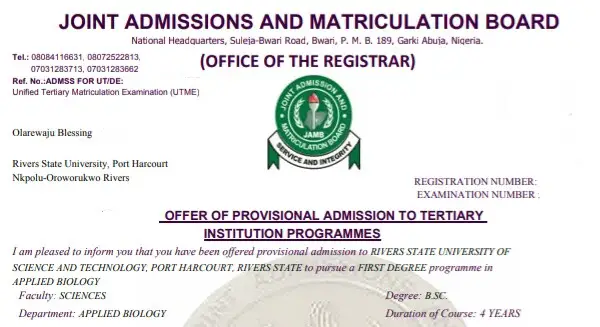
A JAMB admission letter is an official document issued through JAMB’s e-Facility system to candidates whose admissions have been processed through the Board System.
It contains important information about your admission, including your name, JAMB registration number, institution and course of study.
Candidates may be asked to present the document during admission screening, clearance or registration.
JAMB also advises candidates to print their admission letters and result slips as part of the process for confirming their status on the Board’s matriculation list.
You can access the official JAMB candidate portal here:
Official JAMB e-Facility portal: https://efacility.jamb.gov.ng/account/
Always use the official website when accessing your admission information or making payments.
CHECK OUT:How to Check JAMB Admission Status on CAPS 2026
Requirements for Printing Your JAMB Admission Letter
Before starting, prepare the information and resources you may need.
1. Your JAMB profile login details
You will generally need the email address and password associated with your JAMB profile.
2. Your JAMB registration number
Keep your registration number available in case the portal requests it during the printing process.
3. Your examination year
You must select the correct year for the examination associated with your admission.
For example, candidates admitted through the 2026 admission process should select the appropriate examination year when prompted.
4. An internet-enabled device
You can use a smartphone, tablet or computer to access the JAMB portal.
5. Money for the printing fee
JAMB charges a fee for its admission letter printing service. Check the amount displayed on the official payment page before proceeding.
6. Access to a printer or PDF-saving option
You can print the letter directly if you have a printer. Otherwise, you can save the document as a PDF and print it later.
How to Print JAMB Admission Letter 2026
Follow these steps carefully to print your admission letter through the official JAMB portal.
Step 1: Visit the Official JAMB e-Facility Portal
Open your browser and visit:
https://efacility.jamb.gov.ng/account/
This is the official JAMB e-Facility portal for candidates.
Avoid unofficial websites that ask for your JAMB login details or promise to print admission letters through unauthorised methods.
Step 2: Log In to Your JAMB Profile
Enter the email address and password associated with your JAMB account.
Click the login option to access your dashboard.
If you have forgotten your password, use the available account recovery option. Do not create another profile simply because you cannot remember your login details.
JAMB’s official admission letter printing instructions direct candidates to create a profile if they are new users and log in with their existing details if they already have an account.
Step 3: Locate the Print Admission Letter Option
After logging in, look for the Print Admission Letter service on your dashboard.
Select the option to continue.
The position of the service may vary slightly depending on the current portal layout, but you should look for the service with that name.
If you cannot find it, check the available services on your dashboard or consult the official JAMB portal for the appropriate route.
Step 4: Review the Transaction Details
After selecting the service, the portal may generate a transaction ID.
Review the information displayed before proceeding to payment.
Keep the transaction ID safe because it may be useful if you need to check your payment status or resolve a transaction problem.
If JAMB sends a transaction confirmation to your registered email address, keep that message for reference.
Step 5: Pay the JAMB Admission Letter Printing Fee
Follow the payment instructions displayed on the official portal.
Select an available payment method and complete the transaction as directed.
JAMB’s published payment schedule lists the admission letter service at ₦1,000, with a separate service charge shown for applicable services. Confirm the total payable amount on the live payment page before making payment because charges and procedures may change.
You should also make sure you are paying for the correct service.
Important: Do not make a second payment immediately if your first transaction appears unsuccessful. Check the transaction status first to avoid paying twice.
Step 6: Enter Your Examination Year and Registration Number
After your payment has been confirmed, follow the portal’s instructions to continue.
You may be asked to provide:
- Your examination year
- Your JAMB registration number
Enter the information carefully.
Check that your registration number is correct before submitting it. An incorrect number or examination year may prevent the portal from retrieving your admission record.
Step 7: Generate Your JAMB Admission Letter
Submit the required information.
If your admission record is available and the transaction has been completed successfully, the portal should display your admission letter.
Take a moment to review the document before printing it.
Check your name, institution, course and other admission details to ensure they match your records.
Step 8: Print Your Admission Letter
If you have a printer, open the print option and produce a clear copy of the document.
Make sure the text is readable and the important details are visible.
If you are using a cybercafé, download the document yourself where possible and ask the attendant to print it without changing its contents.
Keep the printed letter in a safe place because your institution may request it during clearance or registration.
How to Print JAMB Admission Letter Without a Printer
You do not need to own a printer to obtain your admission letter.
If you are using a smartphone or laptop at home, you can save the document and print it later.
Follow these steps:
- Log in to your JAMB e-Facility account.
- Complete the admission letter printing process.
- Open the generated admission letter.
- Select the download or print option available in your browser or document viewer.
- If printing is available, choose Save as PDF as the destination.
- Save the PDF to your device or another secure location.
- Take the file to a trusted printing centre when you need a hard copy.
Before leaving the printing centre, confirm that the document is complete and readable.
Keep a digital copy as a backup in case you need to print another copy later.
How Much Does It Cost to Print JAMB Admission Letter in 2026?
JAMB’s published payment schedule lists the standard admission letter printing service at ₦1,000, with a separate ₦100 service charge shown for applicable printing services.
However, you should confirm the current total on the official JAMB payment page before paying.
Do not rely entirely on old social media posts or information from previous admission years.
The amount you pay at a cybercafé may also include a separate fee for internet access, assistance or physical printing. These are not necessarily JAMB charges.
To avoid unnecessary expenses, check the official amount first and ask the printing centre to explain any additional service fee.
Can I Print My JAMB Admission Letter for Previous Years?
Candidates may need admission letters from earlier examination years for school records, clearance or other administrative purposes.
JAMB provides admission letter printing services through its e-Facility system, but the availability of a particular record depends on the candidate’s profile and admission circumstances.
If you are printing an older admission letter, select the relevant examination year when prompted.
If the portal cannot retrieve your admission information, contact JAMB through its official support channels or visit an appropriate JAMB office for guidance.
Do not assume that an old admission record has been deleted simply because it does not appear immediately.
Can I Print My JAMB Admission Letter Without Accepting Admission on CAPS?
You should first check your admission status on JAMB CAPS and follow the required admission acceptance process.
If you have been offered admission, make sure you have accepted the offer where required and that the admission has been properly processed.
JAMB’s admission letter printing service is intended for candidates with admission records. If your admission has not been finalised, you may be unable to generate the letter.
To check your status, use the official JAMB e-Facility portal and open the relevant admission status or CAPS section.
If your admission status is still being processed, follow your institution’s updates and contact JAMB if the problem persists.
What Is the Difference Between a JAMB Admission Letter and a School Admission Letter?
These documents are related, but they are not necessarily the same.
A JAMB admission letter is obtained through JAMB’s official e-Facility system. It confirms the admission recorded by JAMB.
A school admission letter is issued through your institution’s admission process. It may contain information about the school’s offer, registration instructions or acceptance requirements.
Some institutions ask candidates to submit both documents during clearance.
For this reason, do not assume that downloading your university’s admission letter means you no longer need your JAMB admission letter.
Check your institution’s official clearance requirements to know exactly which documents you must submit.
Why Can’t I Print My JAMB Admission Letter?
If you cannot print your admission letter, several issues may be responsible.
Here are common problems and what you can do.
1. Your Admission Is Not Showing on JAMB CAPS
If your admission has not been processed or reflected on JAMB’s system, the portal may not be able to generate your admission letter.
Check your admission status first.
If your institution has published your name but CAPS still shows a different status, confirm the offer through the school’s official portal and contact the admission office if necessary.
2. You Selected the Wrong Examination Year
Choosing the wrong examination year can prevent the system from retrieving your admission record.
Return to the relevant section and select the correct year.
Then enter your JAMB registration number carefully.
3. Your Payment Has Not Been Confirmed
Sometimes, a payment may take time to reflect on the portal.
Check the transaction status before attempting another payment.
Keep your transaction ID and payment receipt in case you need to raise a complaint.
4. You Cannot Log In to Your JAMB Profile
If your login details are incorrect, check that you are using the email address associated with your account.
If you have forgotten your password, use the official recovery process.
Avoid sharing your password with people who claim they can recover your account for you.
5. The JAMB Portal Is Not Responding
The portal may occasionally experience technical problems or heavy traffic.
If the page does not load properly, try again later.
You can also switch browsers, check your internet connection or use a computer if you are having trouble on your phone.
6. Your Admission Details Are Incorrect
If the letter displays an incorrect course, institution or other important information, do not alter the document yourself.
Contact your institution or JAMB through an official channel to find out how to correct the record.
Keep any relevant admission notices or supporting documents available when making your enquiry.
What Should I Do If I Paid but Cannot Print My Admission Letter?
Do not immediately pay again.
First, return to your JAMB profile and check your payment or transaction status.
If the transaction is marked as successful, return to the admission letter printing service and follow the instructions to continue.
If the payment remains pending or the portal displays an error, keep your transaction ID and payment evidence.
Then use JAMB’s official support channels to report the problem.
You should explain when you made the payment, the service you selected and the message displayed on your screen.
Never share your bank PIN, card PIN or online banking password with anyone claiming to resolve a JAMB payment problem.
Is the JAMB Admission Letter Needed for School Clearance?
Many Nigerian tertiary institutions require candidates to present their JAMB admission letters during clearance or registration.
The document may be used to confirm your admission details alongside other academic records.
Depending on your institution, you may also be asked to provide:
- JAMB result slip
- O’level result
- School admission letter
- Birth certificate or declaration of age
- Local government or indigene certificate, where required
- Passport photographs
- Other clearance documents specified by the institution
Requirements differ across institutions, so check your school’s official instructions before your clearance date.
Is the JAMB Admission Letter Needed for NYSC?
Your JAMB admission letter can be important when verifying your admission history and academic records.
JAMB also provides an official matriculation list service. Its instructions tell candidates to print their admission letters and result slips and have the documents verified by their institution’s admission officer.
If you intend to participate in the National Youth Service Corps (NYSC), check your matriculation status and follow the current requirements issued by JAMB and NYSC.
Printing the admission letter alone does not automatically guarantee that you have satisfied every NYSC requirement.
You should confirm that your name and relevant records meet the applicable requirements.
How to Check Your Name on the JAMB Matriculation List
After printing your admission letter, you can also check the JAMB matriculation list if required.
Visit the official JAMB matriculation list page:
https://efacility.jamb.gov.ng/CheckMatriculationList
Follow the instructions on the page and provide the requested examination details and registration number.
If your name does not appear, read the instructions provided by JAMB and consult your institution’s admission office.
Do not assume that printing your admission letter automatically completes the matriculation list process.
How to Keep Your JAMB Admission Letter Safe
Once you have printed your letter, take a few simple steps to protect it.
Keep the original digital file. Save a PDF copy in a secure folder on your phone or computer.
Make a backup. Store another copy in a secure cloud account or on a trusted storage device if available.
Protect your personal information. Avoid posting the full admission letter on social media because it contains personal details.
Keep your printed copies safe. Store them with your other admission and academic documents.
Check the details. If you discover an error, contact the appropriate authority rather than editing the official document yourself.
These simple steps can save you time if your school requests another copy later.
Common Mistakes to Avoid When Printing JAMB Admission Letter
Candidates can prevent many problems by avoiding a few common mistakes.
Using an unofficial website
Always begin with the official JAMB e-Facility portal.
Paying before checking the admission status
Confirm that your admission has been processed before paying for the printing service.
Entering the wrong registration number
Double-check your registration number and examination year before submitting them.
Paying twice
Check the status of an existing transaction before attempting another payment.
Losing the PDF copy
Save a digital backup so you can print another copy when necessary.
Ignoring errors on the letter
If your admission details are incorrect, contact JAMB or your institution for guidance.
Sharing login details with strangers
Your JAMB account contains personal information. Keep your password private and use official support channels when you need help.
Frequently Asked Questions About Printing JAMB Admission Letter
How do I print my JAMB admission letter online?
Visit the official JAMB e-Facility portal, log in to your profile, select Print Admission Letter, complete the required payment and provide the examination details requested. Follow the instructions to generate and print your letter.
How much is JAMB admission letter printing in 2026?
JAMB’s published payment schedule lists the admission letter printing service at ₦1,000, with a separate service charge shown for applicable services. Confirm the current total on the official portal before making payment.
Can I print my JAMB admission letter with my phone?
Yes. You can access the e-Facility portal using a smartphone. You can also save the generated document as a PDF, where supported, and print it later.
Can I print my JAMB admission letter without a cybercafé?
Yes. If you have an internet connection, your JAMB login details and a suitable payment method, you can complete the process yourself. You only need a printing centre if you want a physical copy and do not have a printer.
Can I print my JAMB admission letter without my registration number?
The portal may request your JAMB registration number during the printing process. If you cannot remember it, use JAMB’s official registration number retrieval service before continuing.
What should I do if my JAMB admission letter is not showing?
Check your admission status, confirm the examination year and make sure your admission has been properly processed. If the problem continues, contact JAMB or your institution through official channels.
Can I print my JAMB admission letter more than once?
You can check the official portal for access to your admission record and available printing options. Keep a PDF copy of your letter so you do not need to retrieve it again unnecessarily.
Is the JAMB admission letter the same as the school admission letter?
No. The JAMB admission letter comes through JAMB’s e-Facility system, while the school admission letter is issued through the institution’s admission process. Your school may require both.
Do I need my JAMB admission letter for clearance?
Many institutions request it during clearance and registration. Check your school’s official list of required documents to confirm its specific requirements.
What happens if I paid for the admission letter but it did not print?
Check your transaction status first. If payment was successful, return to the printing service and follow the instructions. If the issue persists, report it to JAMB using your transaction ID and payment evidence.
Final Thoughts
Printing your JAMB admission letter is an important step after securing admission into a Nigerian tertiary institution.
The process is straightforward when you use the official e-Facility portal, enter the correct details and follow the payment instructions.
Before printing, confirm that your admission has been properly processed. After generating the letter, check your details, save a PDF copy and keep the printed document safe.
If you experience a payment problem or cannot find your admission record, do not panic or pay an unofficial agent to fix it. Check your transaction status and contact JAMB or your institution through official channels.
Most importantly, follow your school’s clearance instructions so you can prepare all the documents needed for registration without unnecessary delays.