
Introduction
The moment your JAMB results are released, the excitement hits differently. You’ve texted 55019, gotten your score via SMS, and now what? Here’s the thing: your SMS score confirmation doesn’t count as official proof. Universities, polytechnics, and colleges of education need one specific document from you, your JAMB original result slip.
This is the official document with your passport photograph, detailed subject scores, and verification reference. Without it, your admission journey is incomplete. In this guide, I’ll walk you through exactly how to access, pay for, and print your JAMB original result slip in 2026/2027, no stress, no confusion.
SEE ALSO:JAMB Cut Off Mark 2026/2027 for All Schools;Official List Released
What Is the JAMB Original Result Slip?
Before we jump into the steps, let’s clarify something that confuses many candidates: the exam slip and the original result slip are two different documents.
The exam slip you printed in April was your entry pass to the CBT examination center. It showed your exam date, center, and time slot. Once you sat the exam, its job was done.
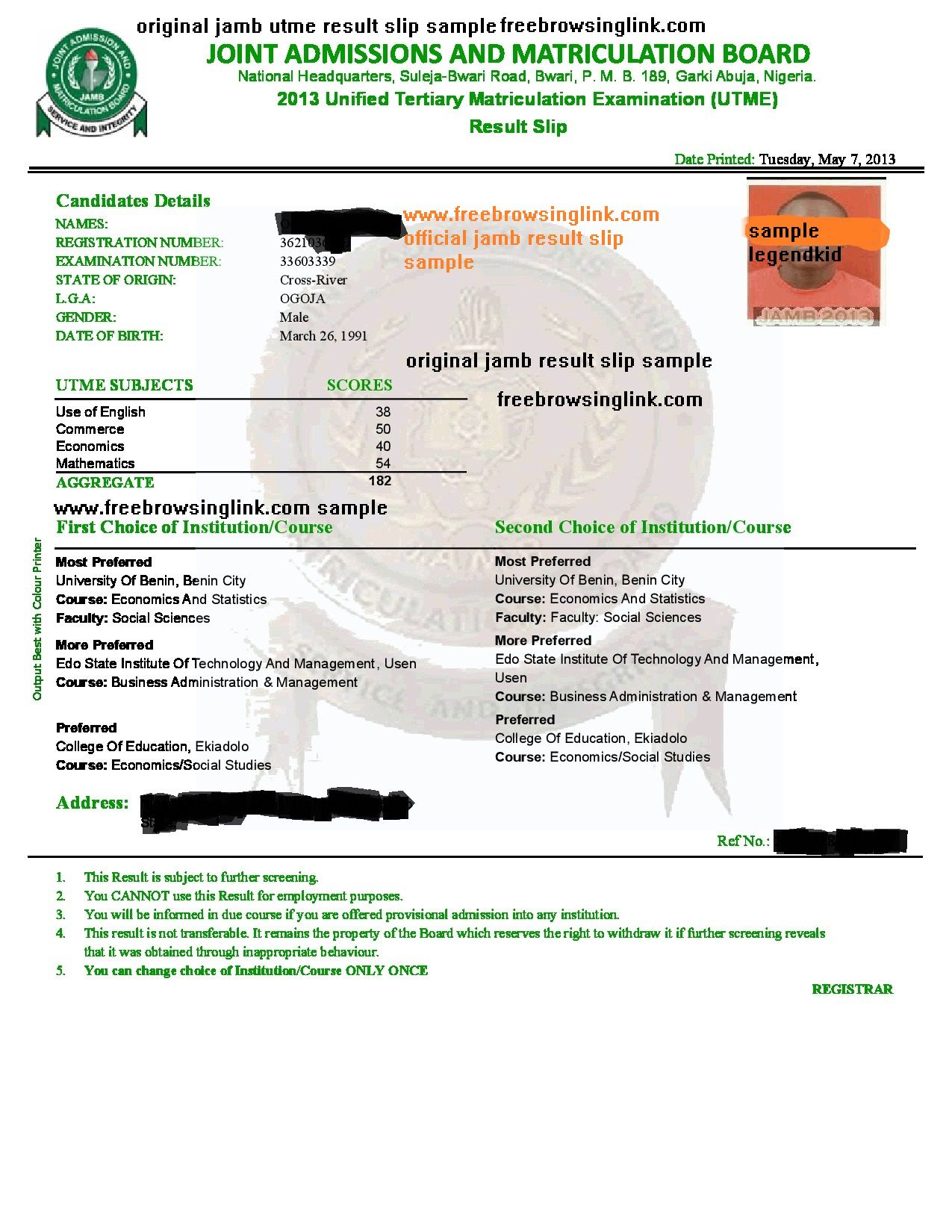
The original result slip is your official proof of performance. It contains:
- Your official UTME score
- Your passport photograph
- Complete subject scores
- Personal details verification
- JAMB reference number for cross-checking
- Admission status recommendations
Universities require this slip during post-UTME screening, admission clearance, and registration. You literally cannot proceed without it.
How to Print Your JAMB Original Result Slip: Step-by-Step Guide
Step 1: Visit the Official JAMB Portal
Open your web browser and navigate to https://efacility.jamb.gov.ng/
This is the only legitimate portal where you can print your original result slip. Bookmark this URL and ignore any other websites claiming to generate your result,they’re not official sources, and institutions will reject them.
Step 2: Log In with Your Credentials
Enter the email address and password you used during your JAMB registration. If you’ve forgotten your password, click “Forgot Password” on the login page.
Pro tip: Use the same device and browser where you initially registered if possible to avoid authentication issues.
Step 3: Locate and Click “Print Result Slip”
Once logged into your dashboard, look for the “Print Result Slip” option on the left-side menu. Click it to proceed.
Step 4: Make Your Payment (₦1,500)
JAMB charges ₦1,500 to print your original result slip. This is the official fee as of 2026. The payment is processed through the portal using any method available, debit card, mobile money, or bank transfer.
Payment warning: Never pay anyone outside the official portal. Scammers pose as agents claiming they can process this for you. Do it yourself directly on efacility.jamb.gov.ng.
Step 5: Download, Save, and Print on A4 Paper
After successful payment confirmation, your result slip generates as a PDF file. Download it immediately and save a digital copy to your email or cloud storage (Google Drive, OneDrive).
Print the slip on standard A4 white paper,this is important. Most institutions scan these documents, and poor-quality prints cause verification delays.
Print at least two physical copies. Keep one for your records and one for your admission file.
Important Details About Your Result Slip
Is There an Expiration Date?
No. Your JAMB original result slip is a permanent academic record. Universities may request it during admission, clearance, scholarship applications, or even postgraduate processes years later.
Can You Print Multiple Copies?
Absolutely. You can reprint your slip as many times as needed after the initial payment. Each digital download is free, you only pay the ₦1,500 fee once.
What If You Can’t Access the Portal?
Visit any JAMB-accredited CBT center near you. They can assist you in printing for a small service fee (usually ₦500–₦1,000). Bring your registration number and a valid ID.
Common Mistakes to Avoid
1. Printing from Unofficial Websites Third-party websites that claim to generate result slips are fraudulent. Always print directly from efacility.jamb.gov.ng.
2. Not Keeping Backup Copies Keep at least 3–4 copies: two physical prints and digital backups in your email and cloud storage. Institutions often ask for originals, and you might lose them.
3. Printing on Wrong Paper Always use A4 paper. Printing on smaller sizes or colored paper may get your document rejected during screening.
4. Incorrect Details on the Slip Check your name spelling, registration number, exam year, and subject combinations. If there’s an error, contact JAMB directly at a physical office, not social media or unauthorized channels.
5. Sharing Login Details Never share your JAMB login credentials with anyone, even close friends or family members. Your result is sensitive academic information.
What to Do After Printing Your Slip
After you’ve printed your original result slip, your admission journey truly begins:
✓ Check your cut-off: Compare your score against the minimum requirements for your chosen courses and institutions.
✓ Register for post-UTME: Most universities conduct post-UTME screening, have your slip ready for online registration.
✓ Upload documents: Most institutions require document uploads during screening. Scan a clear copy of your result slip.
✓ Keep it safe: Treat your result slip like your passport. Damage or loss could delay your admission process.
FAQs About JAMB Original Result Slip
Q: When will the 2026/2027 result slips be available for printing? A: JAMB typically opens result slip printing 1-2 weeks after releasing exam results. Monitor the official JAMB social media accounts (@officialjamb) for announcements.
Q: Can I print my result without visiting the portal? A: Yes, any JAMB-accredited center can help. But you still need to authorize payment; either you pay or the center helps process it.
Q: What if my result slip contains wrong information? A: Visit a JAMB office with your registration details and a valid ID. Never attempt to edit or alter the document yourself.
Q: Do universities accept digital copies of result slips? A: Some institutions accept scanned PDF copies during online screening, but you’ll need a physical original during registration and clearance.
Q: How long does it take to get the PDF after payment? A: Usually, it’s instant. If it takes longer than 10 minutes, try logging out and back in, or wait 30 minutes if JAMB’s servers are busy.
Final Thoughts
Getting your JAMB original result slip is straightforward once you know the process. Don’t let scammers, confusing information, or delays discourage you. The system works; millions of Nigerian students have successfully printed theirs.
Visit efacility.jamb.gov.ng, follow these steps, and you’ll have your official document within minutes. Keep multiple copies safe, prepare for your post-UTME, and stay focused on your admission goals.
You’ve come this far. The slip is just the next step toward the university life you’ve worked for.
Good luck! 🎓
This guide is current as of June 2026. JAMB policies may change. Always verify details on the official JAMB portal or visit your nearest office for the latest updates.